

DC 5V 12V 24V Multifunction Pulse Counter Trigger Delay Timer Relay Simple PLC Module for Smart Home
5V
$25.20
Sale price
$25.20
Regular price
$0.00
Skip to product information




DC 5V 12V 24V Multifunction Pulse Counter Trigger Delay Timer Relay Simple PLC Module for Smart Home

DC 5V 12V 24V Multifunction Pulse Counter Trigger Delay Timer Relay Simple PLC Module for Smart Home
$25.20
Sale price
$25.20
Regular price
$0.00
Description
SPECIFICATIONS
Brand Name: eletechsup
Certification: NONE
Choice: yes
Contact Load: Low Power
EU LVD Voltage: Low voltage: Below 50Vac or 75Vdc
High-concerned chemical: none
Model Number: KC23C01
Origin: Mainland China
Power Source: DC
Protect Feature: Sealed
Theory: Time Relay
Use: General Purpose
Voltage: 12V
is_customized: Yes
semi_Choice: yes
Product Name: DC 5V 12V 24V Multifunction Pulse Counter Trigger Delay Timer Relay Simple PLC Module for Smart Home
Package inlcuded:
1 PCS KC23C01 DC 5V/12V/24V 1 channel Counter Cycle Delay ON/OFF Relay Board
Product Specifications:
Working voltage: DC 12V (DC 5V/ DC24V optional)
Working current: Digital tube OFF (Power-Saving Status): Relay OFF 6MA, Relay ON 35MA
Digital tube ON (Working Status): Relay OFF 29MA, Relay ON 56MA
Three states : Working State, Power-Saving Status, Setting State
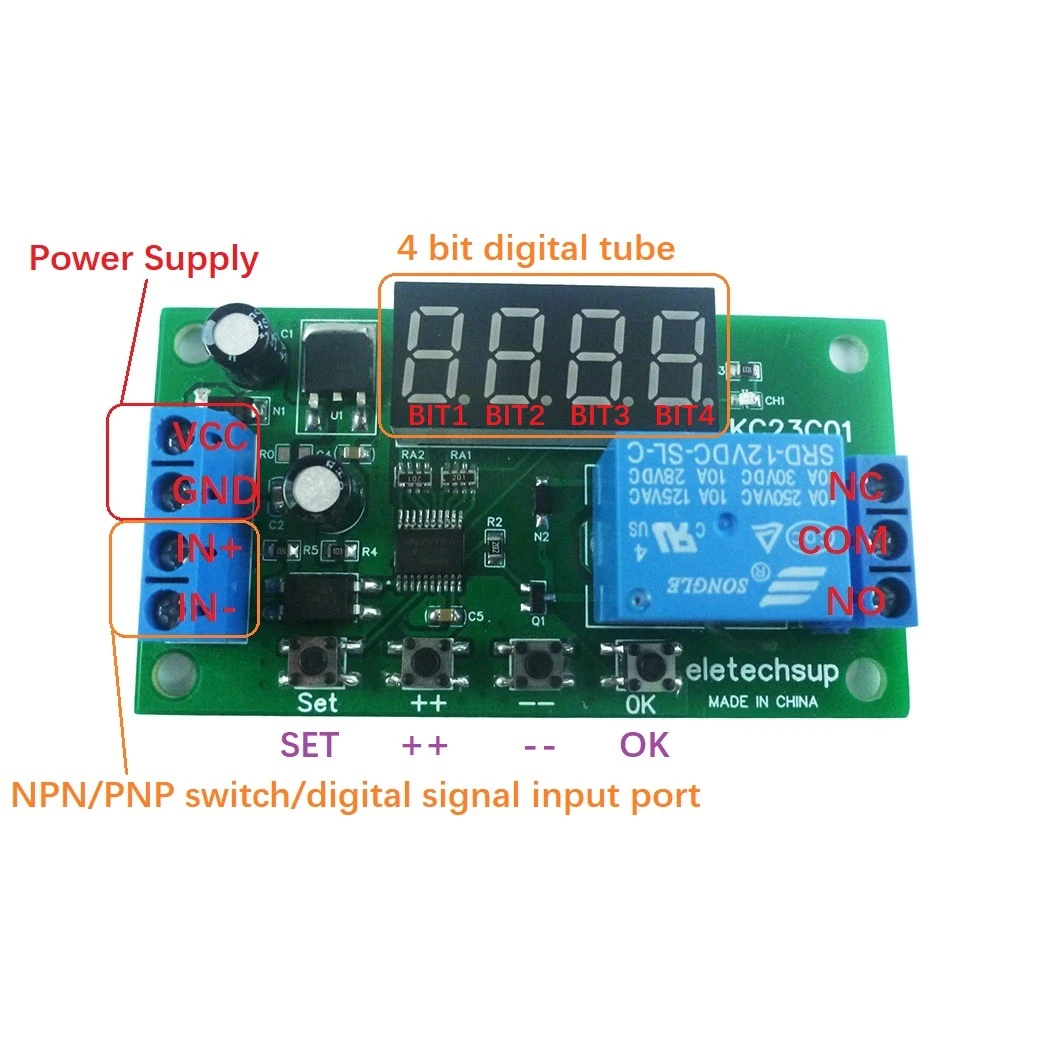
Input port : Optocoupler isolation input, compatible with NPN/PNP input (5-24V switch signal)
Output port : 10A relay NO COM NC three ports
Working mode: F00-F05 single-shot pulse control mode, which is a general delay relaymode
F10-F15 pulse counting control mode, count control relay for input port
Size: 74.4*40.5*19.7MM
Weight : 29.1g
Relay load: 10A/250VAC; 10A/30VDC
Please contact me for detailed instructions !!!
Product Features:
Delay time 0.1s-9999999.9S(115.7Day), Step 0.1S, Accuracy 0.01S
Pulse count value 0-9999 can be set
F00-F05, F10-F15 12 working modes, there are 8 working modes to set the number of cycles
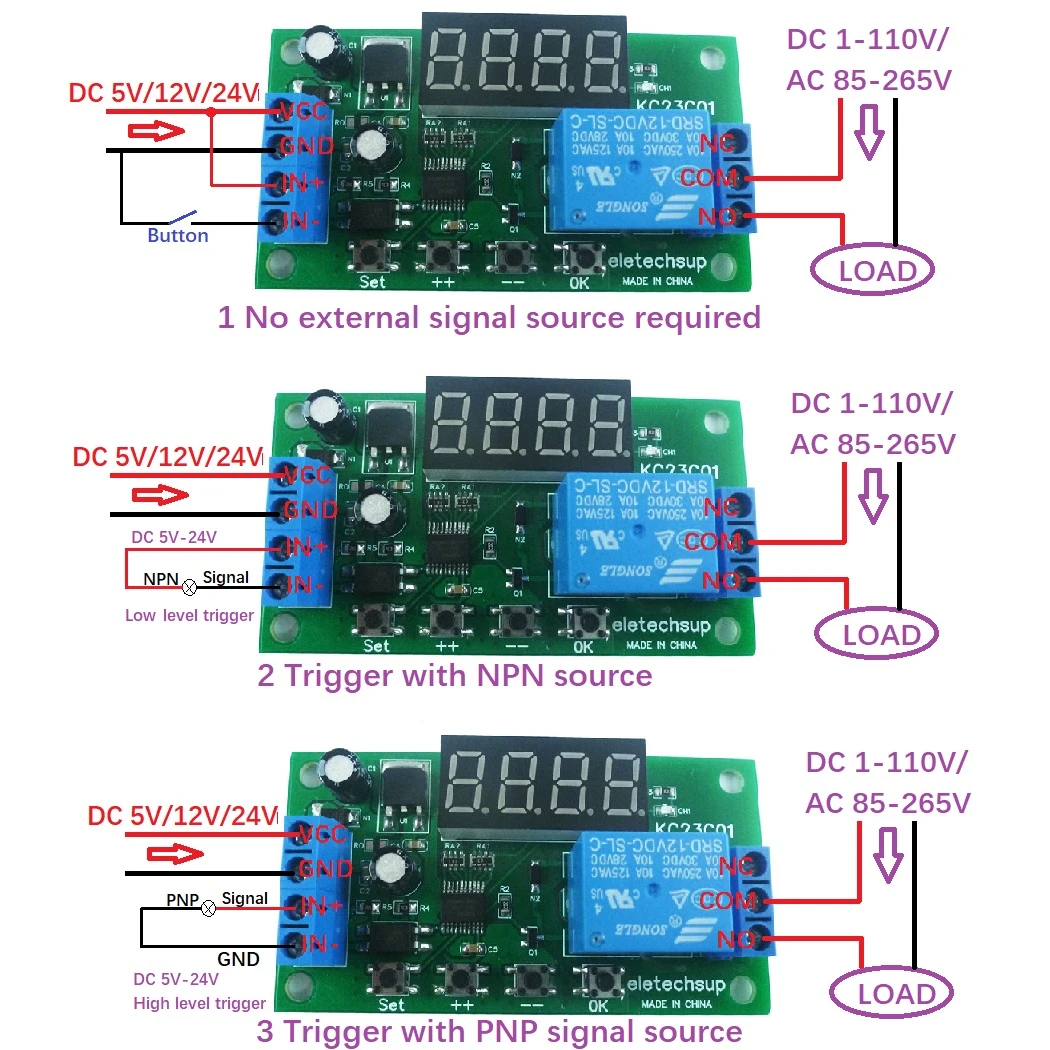
There are three wiring methods for the trigger signal input terminal:
1 No external signal source required
2 Trigger with NPN source
3 Trigger with PNP signal source
Setup Instructions:
Short press: Press key time is less than 2 seconds;
Long press: Press key time more than 2 seconds;
Status : Working State, Power-Saving Status, Setting State
Working State: In working state when powered on, F00-F05 mode displays remaining time, F10-F15 mode displays remaining time and pulse count value.
Note: When the remaining time is higher than four digits, short press the ''OK'' button to scroll to display the remaining time once.
Setting Status: Short press the ''SET'' button to enter the Setting Status, then short press ''SET'' to switch parameters, short press ''++''/''--'' to modify parameters. Short press the ''OK'' button to save the parameters and exit the setting state.
Note: After setting the parameters, it must be powered on again.
Query Status: without modifying the parameter Setting Status, short press the ''SET'' button to enter the Query Status, then press ''SET'' to switch parameters, and short press the ''OK'' button to exit the Query Status
Power-Saving Status: The Working State of the digital tube is turned off. In this state, the digital tube does not display and other functions work normally. Press and hold the ''OK'' button for 5 seconds to enter the Power-Saving Status, and press and hold the ''OK'' button again for 5 seconds to exit the Power-Saving Status.
Notice:
1 In the Power-Saving Status, you can still enter the setting and query state, and it will automatically enter the Power-Saving Status state after 20 seconds of no key operation.
2 After the power is turned on again, the Digital Tube displays for 20 seconds, how to turn off the Digital Tube.
Factory Setting: Press and hold the ''++'' and ''--'' buttons simultaneously for 3 seconds to restore the Factory Settings and turn off the display of the digital tube. Run the default parameters after power cycle.
Note: After setting the parameters, it must be powered on again.
Exception handling:
1 If you encounter inexplicable problems, please power on again (this is because there is no restart after setting parameters)
2 If the problem still cannot be solved after powering on again, please press and hold the ''++'' and ''--'' buttons simultaneously for 3 seconds to restore the factory settings. then power on again
Please contact me for detailed instructions !!!
Working current: Digital tube OFF (Power-Saving Status): Relay OFF 6MA, Relay ON 35MA
Digital tube ON (Working Status): Relay OFF 29MA, Relay ON 56MA
Three states : Working State, Power-Saving Status, Setting State
Input port : Optocoupler isolation input, compatible with NPN/PNP input (5-24V switch signal)
Output port : 10A relay NO COM NC three ports
Working mode: F00-F05 single-shot pulse control mode, which is a general delay relaymode
F10-F15 pulse counting control mode, count control relay for input port
Size: 74.4*40.5*19.7MM
Weight : 29.1g
Relay load: 10A/250VAC; 10A/30VDC
Please contact me for detailed instructions !!!
Product Features:
Delay time 0.1s-9999999.9S(115.7Day), Step 0.1S, Accuracy 0.01S
Pulse count value 0-9999 can be set
F00-F05, F10-F15 12 working modes, there are 8 working modes to set the number of cycles
There are three wiring methods for the trigger signal input terminal:
1 No external signal source required
2 Trigger with NPN source
3 Trigger with PNP signal source
Setup Instructions:
Short press: Press key time is less than 2 seconds;
Long press: Press key time more than 2 seconds;
Status : Working State, Power-Saving Status, Setting State
Working State: In working state when powered on, F00-F05 mode displays remaining time, F10-F15 mode displays remaining time and pulse count value.
Note: When the remaining time is higher than four digits, short press the ''OK'' button to scroll to display the remaining time once.
Setting Status: Short press the ''SET'' button to enter the Setting Status, then short press ''SET'' to switch parameters, short press ''++''/''--'' to modify parameters. Short press the ''OK'' button to save the parameters and exit the setting state.
Note: After setting the parameters, it must be powered on again.
Query Status: without modifying the parameter Setting Status, short press the ''SET'' button to enter the Query Status, then press ''SET'' to switch parameters, and short press the ''OK'' button to exit the Query Status
Power-Saving Status: The Working State of the digital tube is turned off. In this state, the digital tube does not display and other functions work normally. Press and hold the ''OK'' button for 5 seconds to enter the Power-Saving Status, and press and hold the ''OK'' button again for 5 seconds to exit the Power-Saving Status.
Notice:
1 In the Power-Saving Status, you can still enter the setting and query state, and it will automatically enter the Power-Saving Status state after 20 seconds of no key operation.
2 After the power is turned on again, the Digital Tube displays for 20 seconds, how to turn off the Digital Tube.
Factory Setting: Press and hold the ''++'' and ''--'' buttons simultaneously for 3 seconds to restore the Factory Settings and turn off the display of the digital tube. Run the default parameters after power cycle.
Note: After setting the parameters, it must be powered on again.
Exception handling:
1 If you encounter inexplicable problems, please power on again (this is because there is no restart after setting parameters)
2 If the problem still cannot be solved after powering on again, please press and hold the ''++'' and ''--'' buttons simultaneously for 3 seconds to restore the factory settings. then power on again
Please contact me for detailed instructions !!!
Free Shipping Over $199
- Standard Shipping: Standard Shipping (12–18 Business Days)
- Express Shipping: Expedited Shipping (5–9 Business Days)
- Free Shipping: Orders over $199 qualify automatically
- Tracking: Full tracking number provided for all orders
30-Day Return Policy
- Returns: 30-day hassle-free return window
- Condition: Items must be unused and in original packaging
- Refund: Full refund processed within 3-5 business days
Why Choose Us?
- Factory Direct: ISO/TS 16949 certified manufacturer
- Quality: 100% electrical continuity tested before shipment
- Experience: 15+ years in automotive connector industry
- Support: Professional technical support available

You may also like
Blog posts
Title
An excerpt of your blog post's content
Title
Date|Author
Subscribe to our emails
Be the first to know about new collections and special offers.