

DC12~24V T12 OLED 72W Mini Electric Soldering Iron Adjustable Temperature Portable Solder Welding Station BC2 Tip Tool Not SH72
JV100 with K tip
$81.36
Sale price
$81.36
Regular price
$0.00
Skip to product information





DC12~24V T12 OLED 72W Mini Electric Soldering Iron Adjustable Temperature Portable Solder Welding Station BC2 Tip Tool Not SH72
$81.36
Sale price
$81.36
Regular price
$0.00
Description
SPECIFICATIONS
About the scratches: it is normal, That is the melting machine pattern, which is formed by the convergence of plastic around the column in the mold, which does not affect the strength.all product have that!
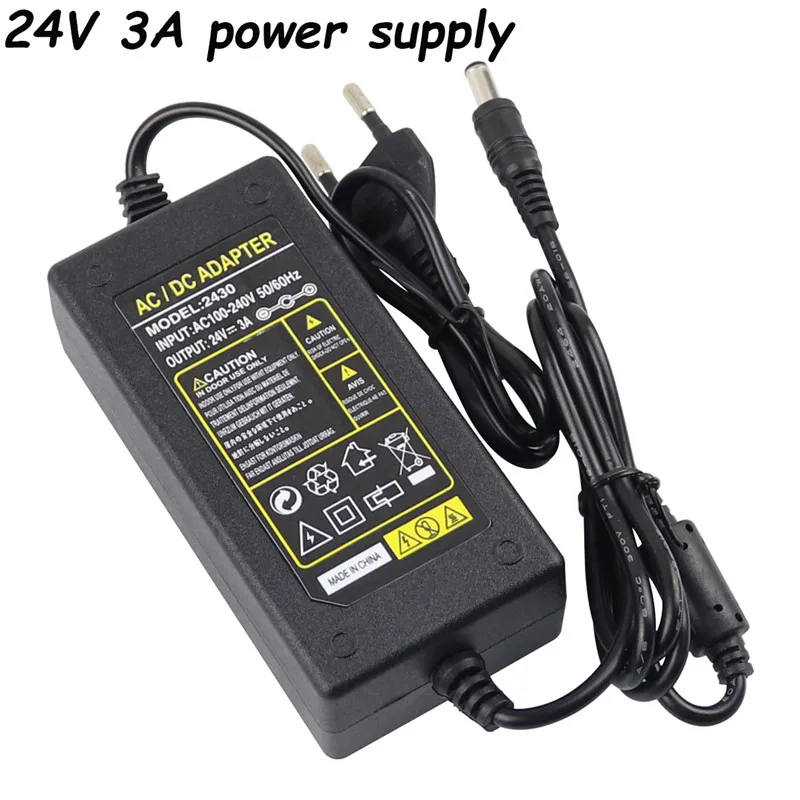
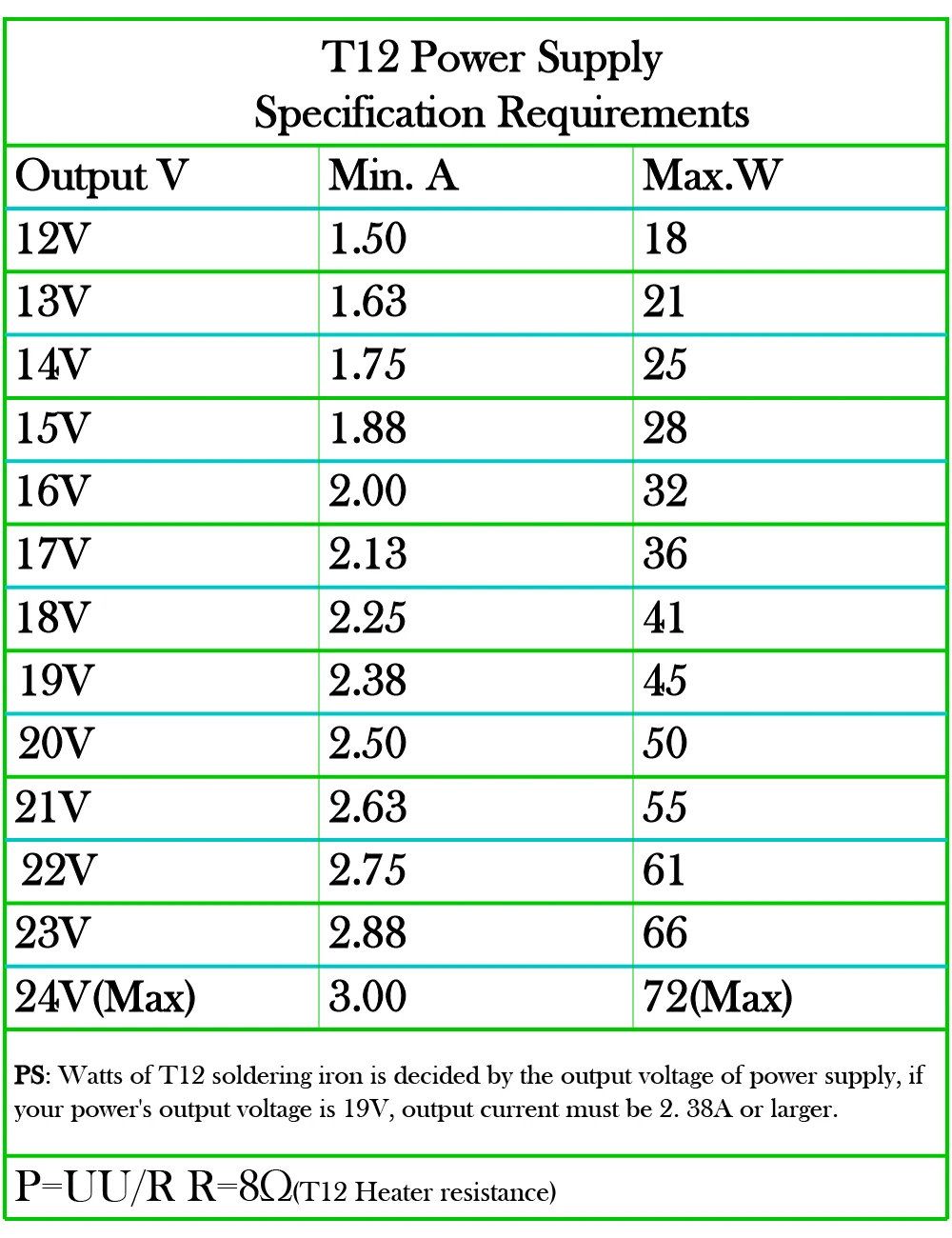
Attention: this product can not use 1a power supply,we suggest 24V 3A
Brand Name: NONE
Certification: NONE
High-concerned chemical: none
If you receive the product have problem: you can contact with before open dispute or left feedback
Input Voltagle: DC24V 3A
Insufficient power supply: the screen does not light up, the soldering iron tip is slightly hot, and the indicator light flashes on and off
Is Smart Device: Yes
Model Number: T12 72W Mini Portable Digital Soldering Iron Set
New change: DMH ON 60 120 means 60 seconds of no user motion before heat goes to standby (180C it seems), then 120 seconds the heat turns off
Note: The Min Station not include power supply!
Note 2: if you need the power supply,you can order that in addition in our store
Origin: Mainland China
Output Voltage: 72W
Pay attention: the tips is T12 Tip,not suitable for SH72 tips
Power Jack: DC5.5*2.1 (DC5521),5525 can not work
Soldering Iron Tip Model: Standard tip is like what you chose
Something rings inside when you shake the soldering iron: this is normal,each station is also like that,because inside it is Vibration switch, to check whether someone is operating
Temperature Adjustment: Support
Temperature Stability: +/-2%
The power supply is reversed: the screen does not light up, the indicator light also not on,and the tip of the soldering iron burns red
Voltage: Others
if you chose Controller only: the product not include t12 tip
if you chose With any 1pcs tip: please left message in your order the tip you want
oled station net weight: 43g
other note: you can chose update version (new with) if you need the black color
please read description before order: you can left message in your order the tip you want
T12 Mini Electric Iron Adjustable Temperature + Tip DC 12-24V 72W Digital Display Soldering Iron DIY Handle Kit
New arrival!
Click into the following photo to have a see! or chose new with any pcs tips,the product is like this!
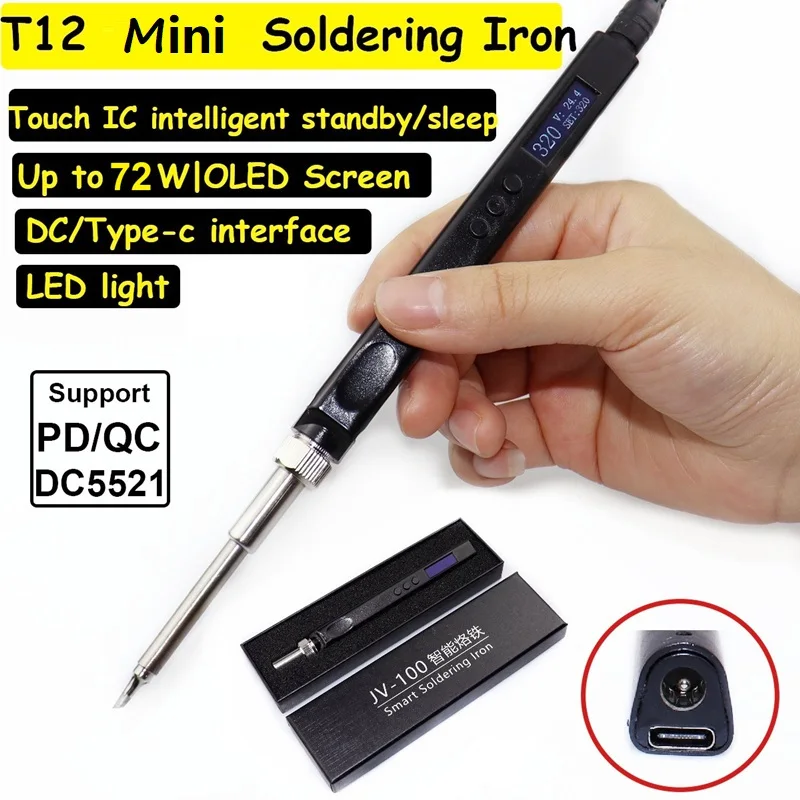
Please read the description before order!
Something rings inside when you shake the soldering iron, this is normal,each station is also like that,because inside it is Vibration switch, to check whether someone is operating! if you mind,please don't order!
Each oled soldering iron station i will test before shipment,make sure it can work (the display won't show error(new version not show wait) and it will heat up) with our store 24V 3A power supply,if the product you receive the display can not work or not heat up,please change other power supply to try or try our store power supply,and Power Supply we suggest with 5521 jack, because 5525 jack can not work!
If you order Controller Only,the product is just the t12 mini station,not include the tip
If you order Upgrade 2 pcs tips,the soldering iron is update version and with 2 pcs t12 tips,you can left messge to change other tip you want!
if you chose 24v eu power supply,the package only the power supply not t12 station!
Our product not include power supply,if you need that ,you can order that in addition,chose 24V EU Power Supply, or click into the following photo to have a see!
Please read the description before order!
Do not insert the t12 tip when the power is on. See if the display is normal, if not, the power supply is reversed. This refers to the power supply you use!
Insufficient power supply: the screen does not light up, the soldering iron tip is slightly hot, and the indicator light flashes on and off! please change other power supply,we suggest 24V 3A power supply!
The power supply is reversed: the screen does not light up, the indicator light also not on,and the tip of the soldering iron burns red,After a long time, and then the MOS tube breaks down, you can replace the Pmos tube(TPC8107, AO4409, or AO4485part)
!
Package listing is just like the photo you chose!
If you chose Controller only,the product is only 1 pcs oled station,not include t12 tip!
If you chose With any 1 pcs T12 tip,the package is 1 oled station with 1 pcs t12 tip!you can left message in your order the Tip you want,otherwise we will send you random Tip!
you can just place the order,we can also send the tips like your request!
Some customers have reported that the screen is not bright. If this OLED soldering station uses a poor quality power supply, this soldering station will not work properly. We recommend that you use a better quality power supply or test it with another power supply. You can also use us Recommend this 24V 3A power supply,we suggest 24V 3A,if 1A power supply,the product can not get enough power to work
Note:
Question:can I change with other tips?
Yes,you can ,you can just left message in your order the tip you want!
Note:
This is T12 soldering station,not sh72 soldering station,can not use sh72 tip,only can use T12 tip,if you order that,please check about that!
Normaly Most regions of Russia delievery date is 2 to 3 week,South Korea is 7 to 10 days,Most European countries are also 2 to 4 weeks delivery!
The new arrival display is OLED display
This product not include power supply!you can order 24v EU power supply in our store in addition!
if you chose with 2 pcs T12 tips,the package include 2 pcs T12 tips
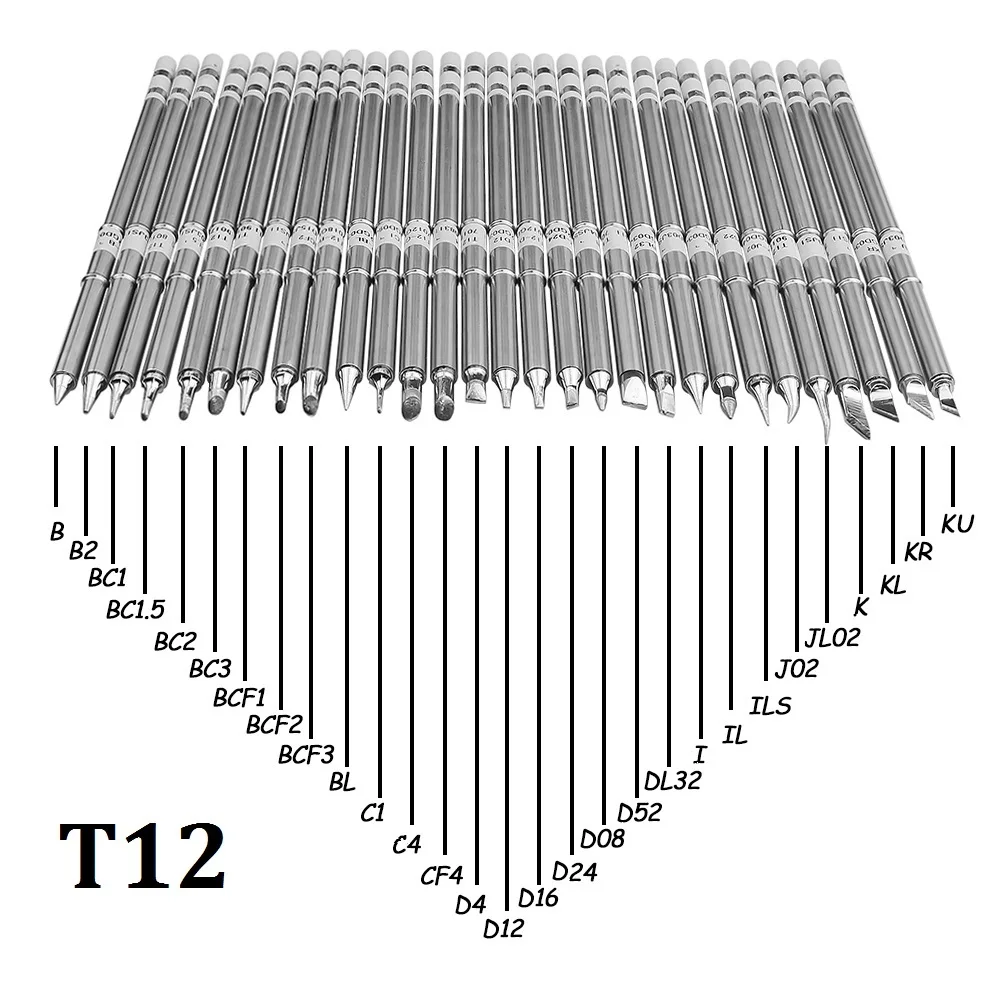
Please left message the tips you want in your order when you place the order,You can chose the types in our following photo as you need(not include BCM2 or BCM3),if you not left message for me,we will send random tips for you!Hope you can understand!
The types are below(Total 29 pcs choose):
T12-K,T12-B,T12-B2,T12-BL,T12-BC1,T12-BC1.5,T12-BC2,T12-BC3,T12-C1,T12-C4,T12-CF4,T12-D12,T12-D16,T12-D24,T12-D4,T12-D52,T12-DL32,T12-J02,T12-JL02,T12-KU,T12-KR,T12-KL,T12-I,T12-IL,T12-ILS,T12-BCF1,T12-BCF2,T12-BCF3,T12-D08
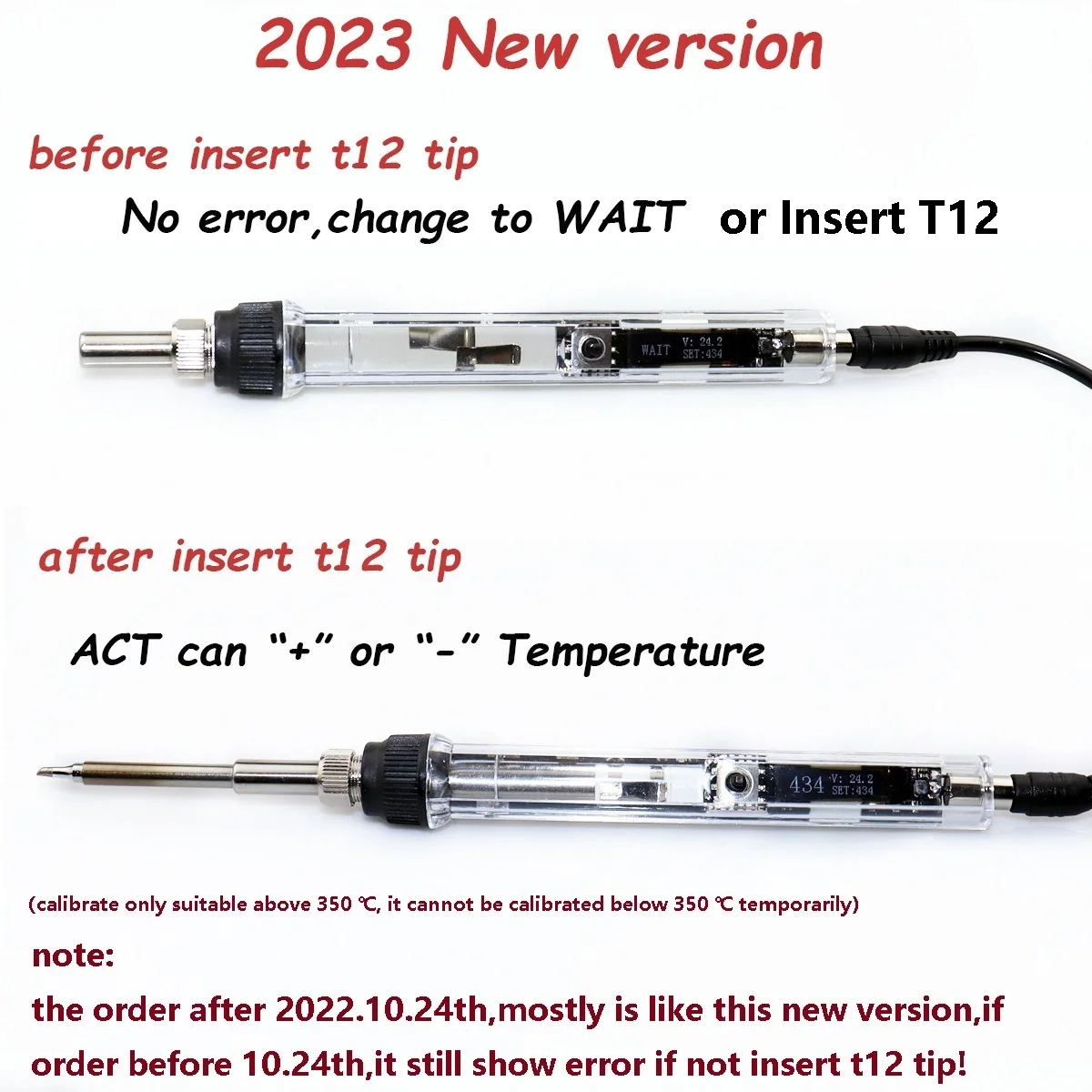
Note: the order after 2022.10.24th,mostly is like new version,if order before 10.24th,it still show error if not insert t12 tip,this is normal,if you mind, please don't buy it.
Some Later new arrival version also no Wait,display only show Insert T12!
1. Knob and display
2. Menu instructions:
Press the knob to enter menu, it will shows 7 options:
ACT: calibration ,HSL: brightness ,DMH: sleep ,LED: always on display ,LAG: language ,IMA:Screen display direction,RTN: return
ACT: calibration (calibrate the temperature only suitable above 350 ℃, it cannot be calibrated below 350 ℃ temporarily)
Insert the T12 tip to handle and power on, set the temperature at 300, until the temperature in "real-time temperature" is stably display at 300, at this time, use a temperature measuring instrument to measure the temperature of T12 tip and record it. such as the measuring temperature is 350, then the calibration value is 50.
temperature is 250, then the calibration value is -50.( Note: if order before 2022.10.24th,it still can not set -50 calibration value!)
Calculation formula: calibration value=measuring temperature - setting temperature
(Note: Before calibration, the value after calibration must be set to 0)
HSL: brightness
brightness adjustable range is 2-100 , 2 is darkest, 100 is the brightest
DMH: sleep
when screen is "DMH ON 5" ,It means that if the operator does not use the soldering iron for 5 seconds(automatically detect the use status of the soldering iron), the soldering iron will stop heating, and it will start heating again after picking it up.
when screen is "DMH OFF",It means that the soldering iron will always be in working condition, and the automatic detection function is turned off.
New change:DMH ON 60 120 means 60 seconds of no user motion before heat goes to standby (180C it seems), then 120 seconds the heat turns off
LED: always on display
when screen is "LED ON 5",It means that after 5 seconds of no key operation, the screen will be off, and when the key is operated again, the screen will light up again.
when screen is "LED OFF", It means the screen will stay on
LAG: language
Available languages are: Chinese , Engligh
IMA: Screen display direction
Can switch left-hand or right-hand operation display
RTN: return
Return to main interface
Please read the description before order!
Question:If The display show Error . There are 3 situations, please check one by one to see which situation you meet: 1. The soldering iron tip is not installed in place or secure, and this will be prompted; 2. The soldering iron tip is damaged; 3. The temperature is lower than 150 degrees, generally It will appear immediately after plugging in or after sleep. If it appears during use, it may be in sleep and stop heating. At this time, you can increase the sleep detection time in the menu or turn it off to suit your working status.
some time you can also try to change Vibration switch,wich maybe can work normal!
The Package listing as what you chose:


If you chose the new version like New with BC2 tip or New with 2 pcs tips or others new is like the following:
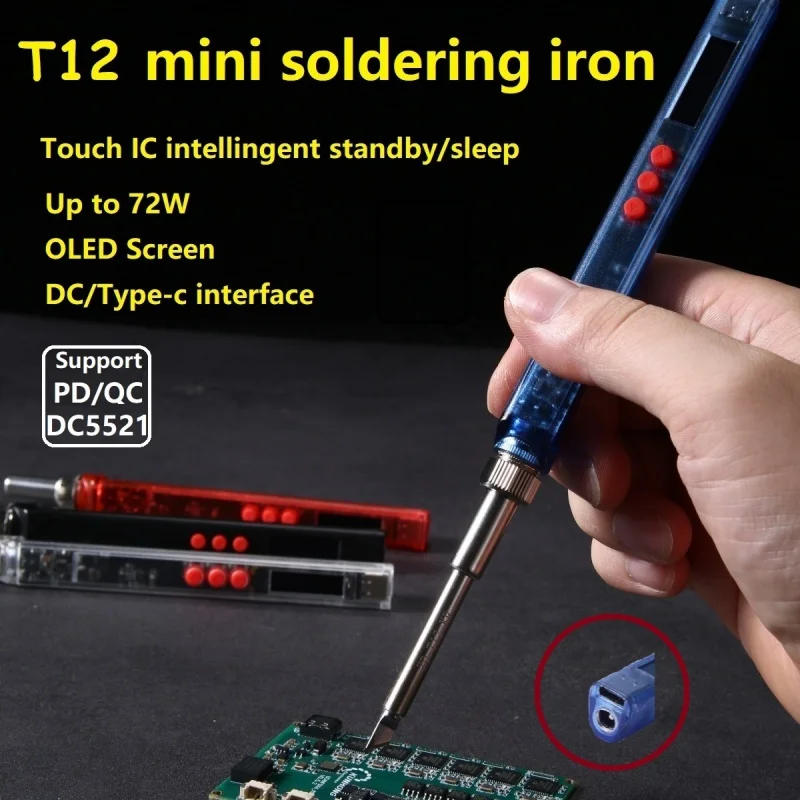
The new T12 Mini soldering Iron is our store classic T12 Oled Station Upgrade,quality is guaranteed!The net weight is 10g lighter than the classic model. Based on the idea of stronger generation by generation, this generation T12 Smart Soldering Irons supports a type-c interface, with built-in PD, QC voltage deception chips, and DC5521 interfaces!like the following photo!
1. Knob and display
2. Menu instructions:
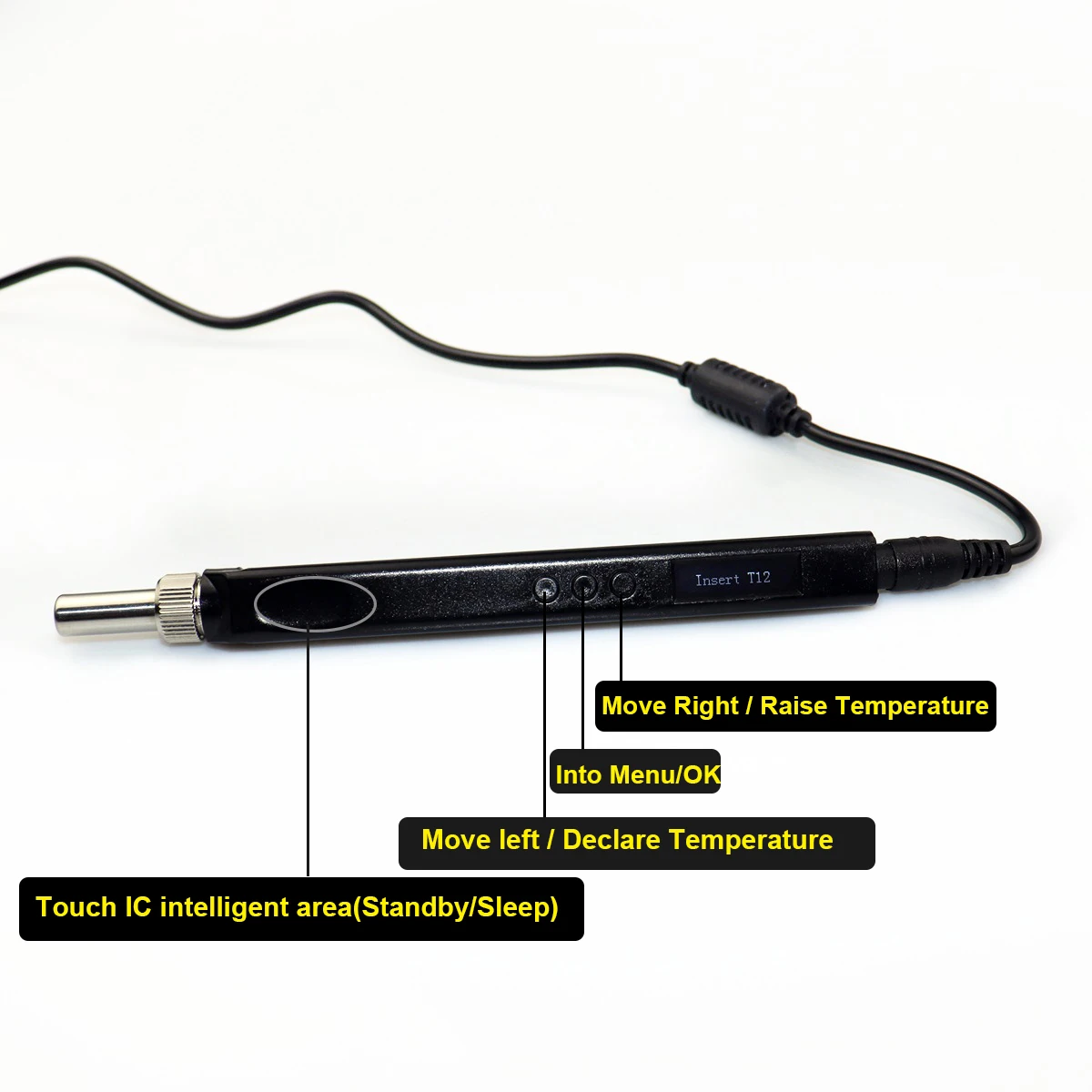
Press the Middle button to enter menu, it will shows 9 options:
ACT: calibration ,WAI: Standby,DMH: sleep ,OUT: power ,EMI: Touch is to detect whether someone is operating,IMA:Screen display direction,LAG: language ,RST: reset,MOD:Manual or automatic selection,VER:Firmware version,RTN: return
ACT: calibration (calibrate the temperature only suitable above 350 ℃, it cannot be calibrated below 350 ℃ temporarily)
Insert the T12 tip to handle and power on, set the temperature at 300, until the temperature in "real-time temperature" is stably display at 300, at this time, use a temperature measuring instrument to measure the temperature of T12 tip and record it. such as the measuring temperature is 350, then the calibration value is 50.
temperature is 250, then the calibration value is -50.
Calculation formula: calibration value=measuring temperature - setting temperature
(Note: Before calibration, the value after calibration must be set to 0)
WAI: Standby Temperature setting
The standby temperature can be set between 180 degrees and 300 degrees
DMH: sleep
when screen is "DMH ON 5" ,It means that if the operator does not use the soldering iron for 5 seconds(automatically detect the use status of the soldering iron), the soldering iron will stop heating, and it will start heating again after picking it up.
when screen is "DMH OFF",It means that the soldering iron will always be in working condition, and the automatic detection function is turned off.
DMH ON 60 120 means 60 seconds of no user motion before heat goes to standby (180C it seems), then 120 seconds the heat turns off(Sleep)
OUT: power duty cycle,100 is 100% output,
This option indicates whether the power supply is stable. If the power supply is unstable, you can adjust the value appropriately. If screen flash, it is recommended to replace the power supply
EMI: Built in capacitive touch IC detect whether someone is operating intelligent standby/sleep mode
Touch sensitivity refers to the recessed area on the handle to detect whether someone is operating. If no one is operating, it enters standby mode, and hibernates for a long time (provided that the Sleep inside is set to be turned on)
IMA: Screen display direction
Can switch left-hand or right-hand operation display
LAG: language
Available languages are: Chinese , Engligh
Note:that the wider the range of finger contact and the faster the pressing speed, the easier the detection will be. The smaller the contact range, the slower the placement speed, and it will be recognized as interference, which can easily lead to errors during operation
RST: reset
Restore factory setting
RTN: return
Return to main interface
FAQ:
Payment
1. 100% payment before delivery, please make sure you have make out the complete correct information, include full name, detail address, post code, phone number, the goods will be shipped to the address that you left in the order, and ldquoP.O. boxrdquo is not allowed in the address.
2. We prefer payment through ESCROW which is a security way for you. If you want to pay by other ways, please contact us.
3. When you place an order, please choose a shipping method and pay for the order including the shipping fee (except for free shipping).
Shipping
1. We will send the items within 1-7 days once your payment is completed.
2. We only ship to confirmed order addresses. Your order address MUST MATCH your Shipping address.
3. The images shown are not the actual item and just are for your reference.
4. SERVICE TRANST TIME is provided by the carrier and excludes weekends and holidays. Transit times may vary, particularly during the holiday season.
Feedback
1. Our goal is 100% positive feedback and 100% customer satisfaction. We do our best to serve our customers the best that we can. Your satisfaction and positive feedback is very important to us.
2. If you are not satisfied with the items you ordered, please contact us before leaving negative feedback. We can work together to resolve any dispute.
3. Please leave positive feedback and 5 stars if you are satisfied with our goods and services.
Free Shipping Over $199
- Standard Shipping: Standard Shipping (12–18 Business Days)
- Express Shipping: Expedited Shipping (5–9 Business Days)
- Free Shipping: Orders over $199 qualify automatically
- Tracking: Full tracking number provided for all orders
30-Day Return Policy
- Returns: 30-day hassle-free return window
- Condition: Items must be unused and in original packaging
- Refund: Full refund processed within 3-5 business days
Why Choose Us?
- Factory Direct: ISO/TS 16949 certified manufacturer
- Quality: 100% electrical continuity tested before shipment
- Experience: 15+ years in automotive connector industry
- Support: Professional technical support available

You may also like
Blog posts
Title
An excerpt of your blog post's content
Title
Date|Author
Subscribe to our emails
Be the first to know about new collections and special offers.