

LCD1602 Module 16x2 Character I2C PCF8574 for Arduino Blue Yellow Green 1602A Development Board Mega2560 LCD 5V Adapter Plate
lcd1602 Blue
$19.35
Sale price
$19.35
Regular price
$0.00
Skip to product information




LCD1602 Module 16x2 Character I2C PCF8574 for Arduino Blue Yellow Green 1602A Development Board Mega2560 LCD 5V Adapter Plate
$19.35
Sale price
$19.35
Regular price
$0.00
Description
SPECIFICATIONS
Brand Name: NONE
Choice: yes
Display Mode: -
High-concerned chemical: none
Model Number: LCD1602
Origin: Mainland China
Resolution: 16*2
is_customized: Yes
LCD1602 Module 16x2 Character I2C PCF8574 for Arduino Blue Yellow Green 1602A UNO R3 Mega2560 IIC Display 5V Adapter Plate
Key Features & Benefits
🔌 I2C Interface, Save Pins – Only SDA/SCL needed, free up GPIOs for other devices.
📺 16x2 Character Display – Show text, numbers, sensor data.
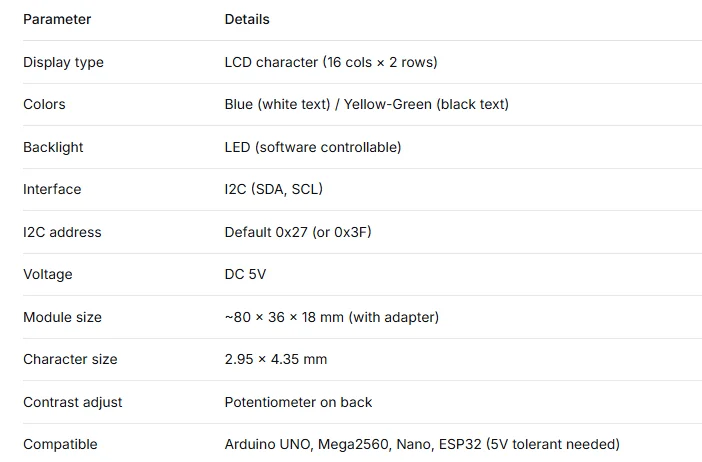
🎨 Two Color Options – Blue background with white text, or Yellow-Green with black text.
🔋 5V Operation – Directly compatible with Arduino 5V systems.
🧩 PCF8574 Adapter Included – Pre-soldered on back, with potentiometer for contrast.
📚 Easy Library – Use LiquidCrystal_I2C, just a few lines of code.
Product Description
The classic LCD1602 character display, now with a PCF8574 I2C adapter pre-soldered. Instead of 6-10 wires, you only need VCC, GND, SDA, SCL (signal: SDA/SCL). Works perfectly with Arduino UNO, Mega2560, Nano, ESP32 (with level shifting) etc. The blue potentiometer on the back adjusts contrast. Default I2C address is usually 0x27 (or 0x3F). Choose between blue or yellow-green screen. Ideal for weather stations, clocks, counters, or any project needing a simple text display.
⚡ Quick Start Guide & Important Tips
🔹 What It Does & What You Need
✅ Does: Display ASCII characters, numbers, custom icons via I2C.
❌ Does NOT: Display Chinese characters (needs graphic LCD), touch, store data.
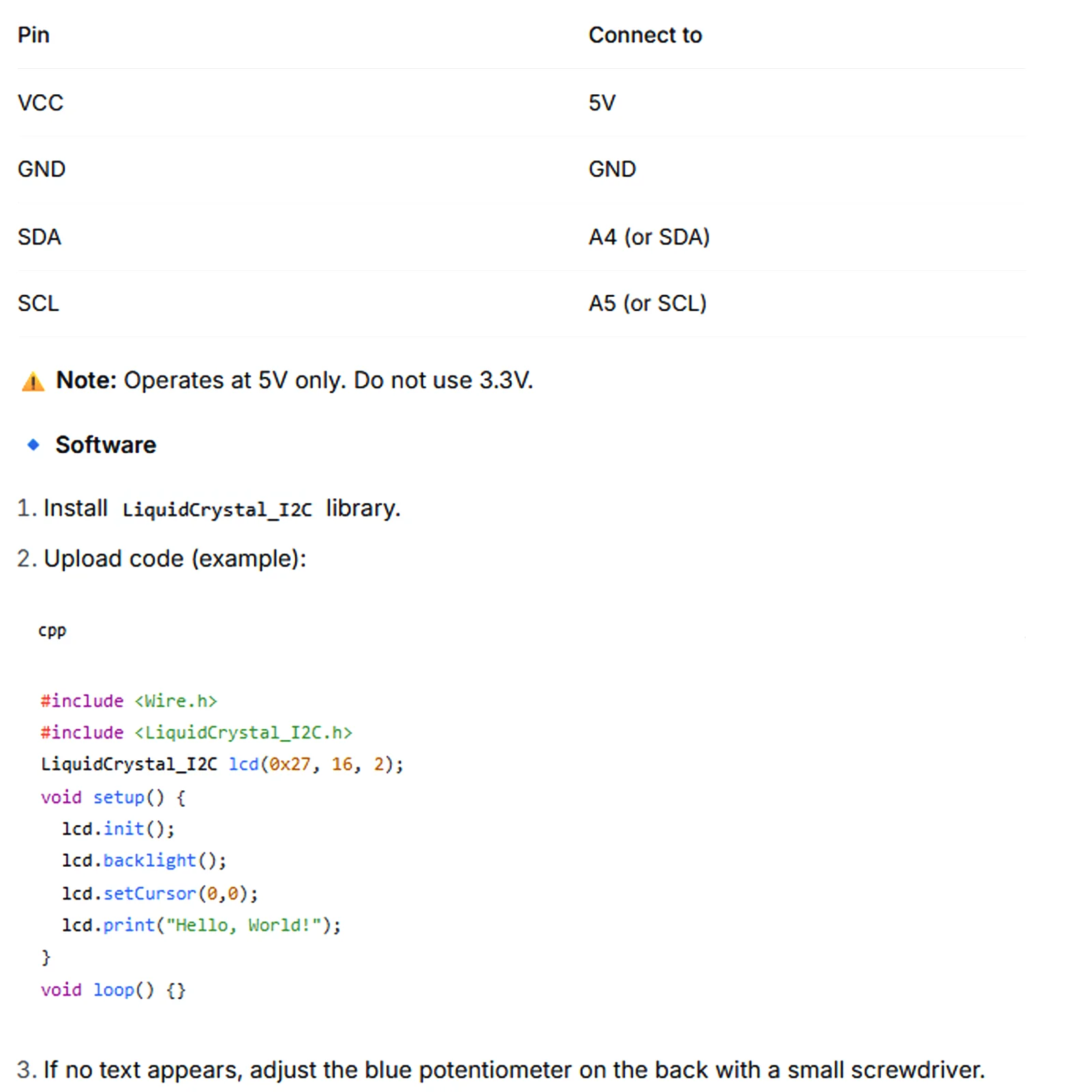
🔧 You need: Arduino (5V), 4 jumper wires (F-F), LiquidCrystal_I2C library.
🔹 Wiring (Arduino UNO)
🔹 Common Questions
❓ Screen lights up but shows blocks or no text?
Adjust the potentiometer (rotate slowly) until characters become clear.
Run an I2C scanner to confirm address (0x27 or 0x3F).
Check SDA/SCL wiring.
❓ Backlight off?
Check VCC/GND. Ensure lcd.backlight() is called in code.
❓ Can I display Chinese?
No, this is a character LCD for English/European characters. See our graphic LCDs for Chinese.
❓ Multiple I2C devices?
Yes, as long as addresses differ. Default 0x27 usually doesn't conflict with sensors.
❓ What is the I2C address?
Most common: 0x27. Some batches: 0x3F. Run I2C scanner to verify.
Specifications
Free Shipping Over $199
- Standard Shipping: Standard Shipping (12–18 Business Days)
- Express Shipping: Expedited Shipping (5–9 Business Days)
- Free Shipping: Orders over $199 qualify automatically
- Tracking: Full tracking number provided for all orders
30-Day Return Policy
- Returns: 30-day hassle-free return window
- Condition: Items must be unused and in original packaging
- Refund: Full refund processed within 3-5 business days
Why Choose Us?
- Factory Direct: ISO/TS 16949 certified manufacturer
- Quality: 100% electrical continuity tested before shipment
- Experience: 15+ years in automotive connector industry
- Support: Professional technical support available

You may also like
Blog posts
Title
An excerpt of your blog post's content
Title
Date|Author
Subscribe to our emails
Be the first to know about new collections and special offers.