

QUESCAN UBX M8 USB GPS Antenna Receiver for Android Linux Windows GPS GLONASS Galileo BeiDou Module NMEA USB GNSS Dongle NEO-M8N
Default Title
$73.68
Sale price
$73.68
Regular price
$0.00
Skip to product information







QUESCAN UBX M8 USB GPS Antenna Receiver for Android Linux Windows GPS GLONASS Galileo BeiDou Module NMEA USB GNSS Dongle NEO-M8N
$73.68
Sale price
$73.68
Regular price
$0.00
Description
SPECIFICATIONS
Brand Name: QUESCAN
Cable Length: 2 meters
Channel: 72
Chipset: UBX M8
GNSS: GPS/QZSS GLONASS Galileo Beidou SBAS
GPS type: Receiver & Antenna
High-concerned chemical: none
Horizontal Accuracy: 1.5m CEP
IS It With PCB: Yes
Interface: USB
Model Name: QU33N
Origin: Mainland China
Protocol: NMEA 0183/UBX
Sensitivity: -167dBm@Tracking
Waterproof level: IP67
Overview
QU33N is a multi‑mode USB GNSS receiver integrated with the u‑blox NEO‑M8N module and 4 MByte on‑board flash memory, enabling device configuration and permanent configuration‑profile storage.
Powered by u‑blox’s high‑performance standard‑precision UBX‑M8030 GNSS chip, this receiver delivers outstanding sensitivity and fast time‑to‑first‑fix across all GNSS constellations. It supports concurrent reception of up to three GNSS systems: GPS and Galileo, paired with either BeiDou or GLONASS. Multi‑constellation simultaneous reception delivers superior positioning accuracy even in urban‑canyon environments, under weak‑signal conditions and high‑dynamic motion scenarios.
It achieves 2.0 m CEP positioning accuracy with an average cold‑start time of 26 seconds. A small built‑in backup battery supports hot‑start operation. Widely deployed for PC‑based navigation, automotive navigation, marine navigation, ranging, autonomous driving, fleet management, vehicle tracking and more.
Key Highlights
• Concurrent reception of up to 3 GNSS constellations (GPS, Galileo, GLONASS, BeiDou)
• Industry‑leading navigation sensitivity of ‑167 dBm
• Industry‑leading low‑power consumption
• Excellent positioning performance in urban‑canyon scenarios
• Built‑in security and data‑integrity protection
• Full support for all satellite‑based augmentation systems
Specification
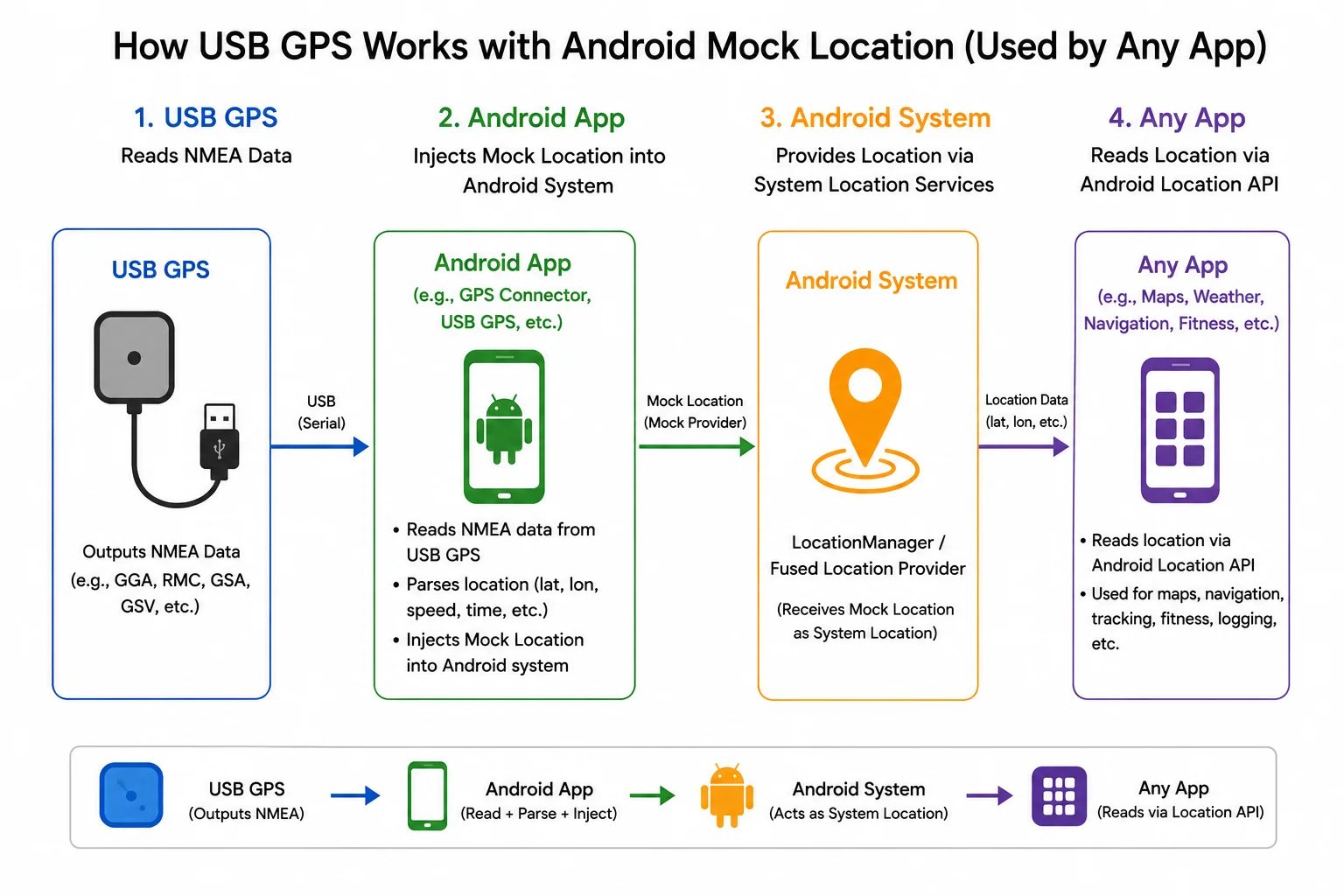
How to use it on Android?
Application that needs to be installed: [GPS Connector], which can be downloaded for free in the Google Store.
Step 1:
In the Android Settings-Developer options, select [GPS Connector] as the mock location application.
If your Android device does not have the developer options, please find a way to activate it on the network according to your device model.
Step 2:
Connect the GPS to the GPS Connector application via USB device-ublox-115200
Step 3:
Wait for the GPS to search for the satellite and locate it. The cold start process is about 1-3 minutes.
Tips for Best Performance
• Place the receiver with a clear view of the sky.
• Avoid covering the antenna with metal objects.
• Wait for a full satellite fix before starting your session.
• For the highest accuracy, allow 1–2 minutes after power-on for the GNSS receiver to fully converge.
Step 4:
Verify the accuracy of positioning in the map application.
Pre-set
•GPS+GLONASS+Galileo+QZSS+SBAS
•115200 baud, 8 bits, no parity bit, 1 stop bit.
•1Hz navigation update rate.
•NMEA version 4.10.
•Input messages: NMEA,UBX.
•Output messages: NMEA GGA, GLL, GSA, GSV, RMC, VTG and GST...etc..
Configuration software
u-center
Performance
Detail
Free Shipping Over $199
- Standard Shipping: Standard Shipping (12–18 Business Days)
- Express Shipping: Expedited Shipping (5–9 Business Days)
- Free Shipping: Orders over $199 qualify automatically
- Tracking: Full tracking number provided for all orders
30-Day Return Policy
- Returns: 30-day hassle-free return window
- Condition: Items must be unused and in original packaging
- Refund: Full refund processed within 3-5 business days
Why Choose Us?
- Factory Direct: ISO/TS 16949 certified manufacturer
- Quality: 100% electrical continuity tested before shipment
- Experience: 15+ years in automotive connector industry
- Support: Professional technical support available

You may also like
Blog posts
Title
An excerpt of your blog post's content
Title
Date|Author
Subscribe to our emails
Be the first to know about new collections and special offers.