

KY-040 360 Degrees EC11 Rotary Encoder Module Brick Sensor Switch Development Board for Arduino With Pins Knob Cap DIY 5V
6 PCS
$36.86
Sale price
$36.86
Regular price
$0.00
Skip to product information




KY-040 360 Degrees EC11 Rotary Encoder Module Brick Sensor Switch Development Board for Arduino With Pins Knob Cap DIY 5V
$36.86
Sale price
$36.86
Regular price
$0.00
Description
SPECIFICATIONS
Brand Name: NONE
Choice: yes
Condition: New
High-concerned chemical: none
Origin: Mainland China
Package: SMD
Quantity: 1
Type: Voltage Regulator
is_customized: Yes
KY-040 360 Degrees EC11 Rotary Encoder Module Brick Sensor Switch Development Board for Arduino With Pins Knob Cap DIY 5V.
Key Features & Benefits
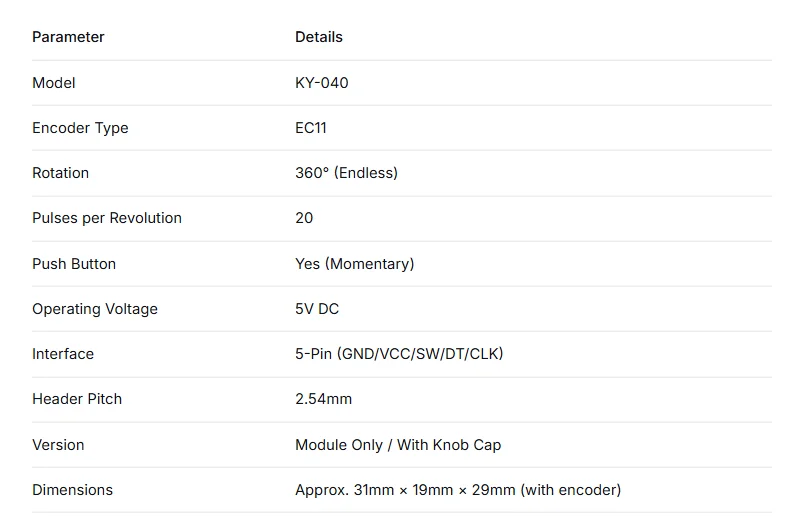
🎛️ 360° Endless Rotation + Push Button: EC11 encoder with continuous rotation and built-in push switch. Rotate to adjust values, press to confirm—complete menu interaction in one component.
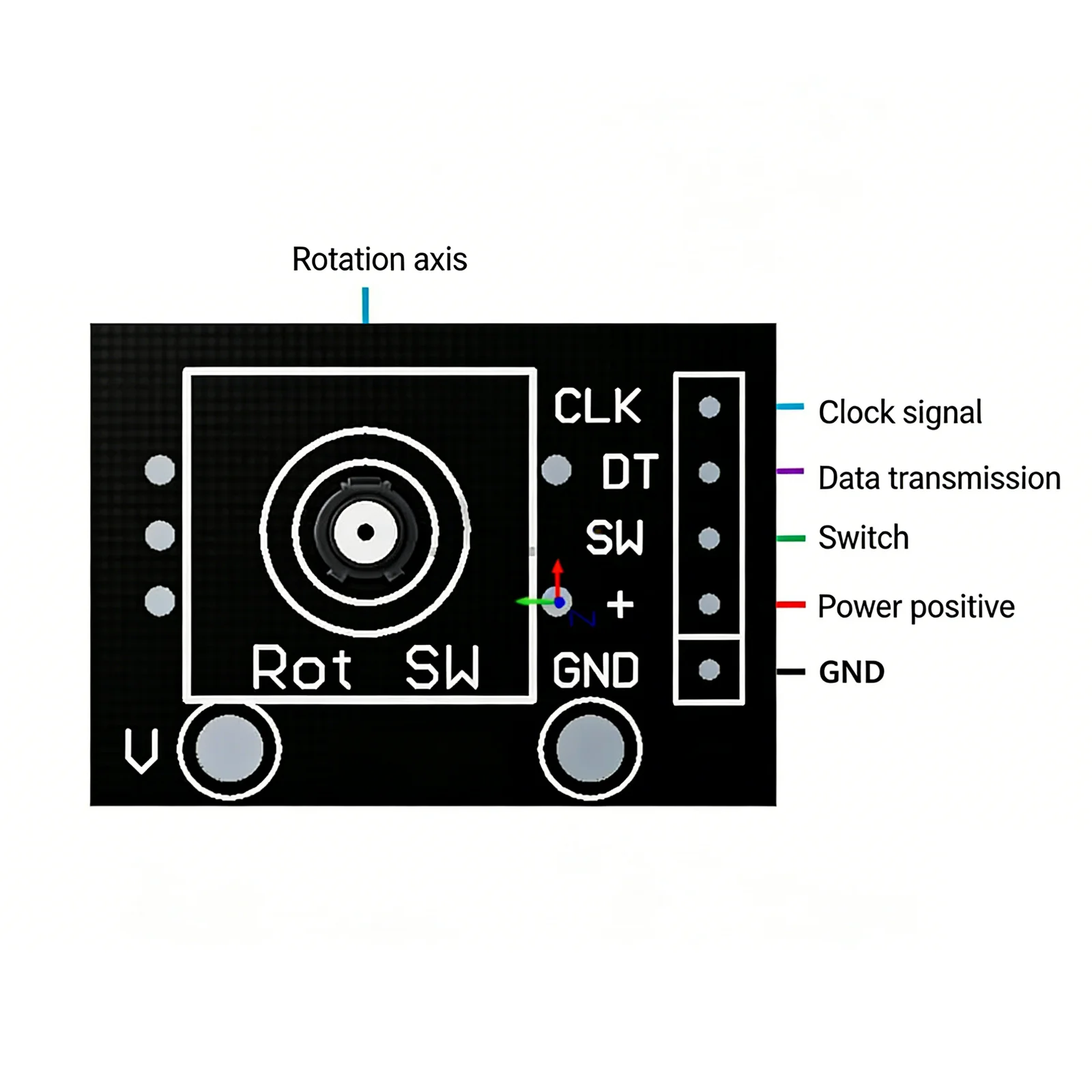
🔌 Standard 5V, Direct Arduino Connect: VCC to 5V, GND common, three signal wires (SW/DT/CLK) for rotation direction and button state. Clearly labeled pins, simple wiring.
📐 Brick-Style Module, Breadboard Ready: Standard 2.54mm header spacing. Plug directly into breadboards or connect with Dupont wires. Mounting holes for panel fixing.
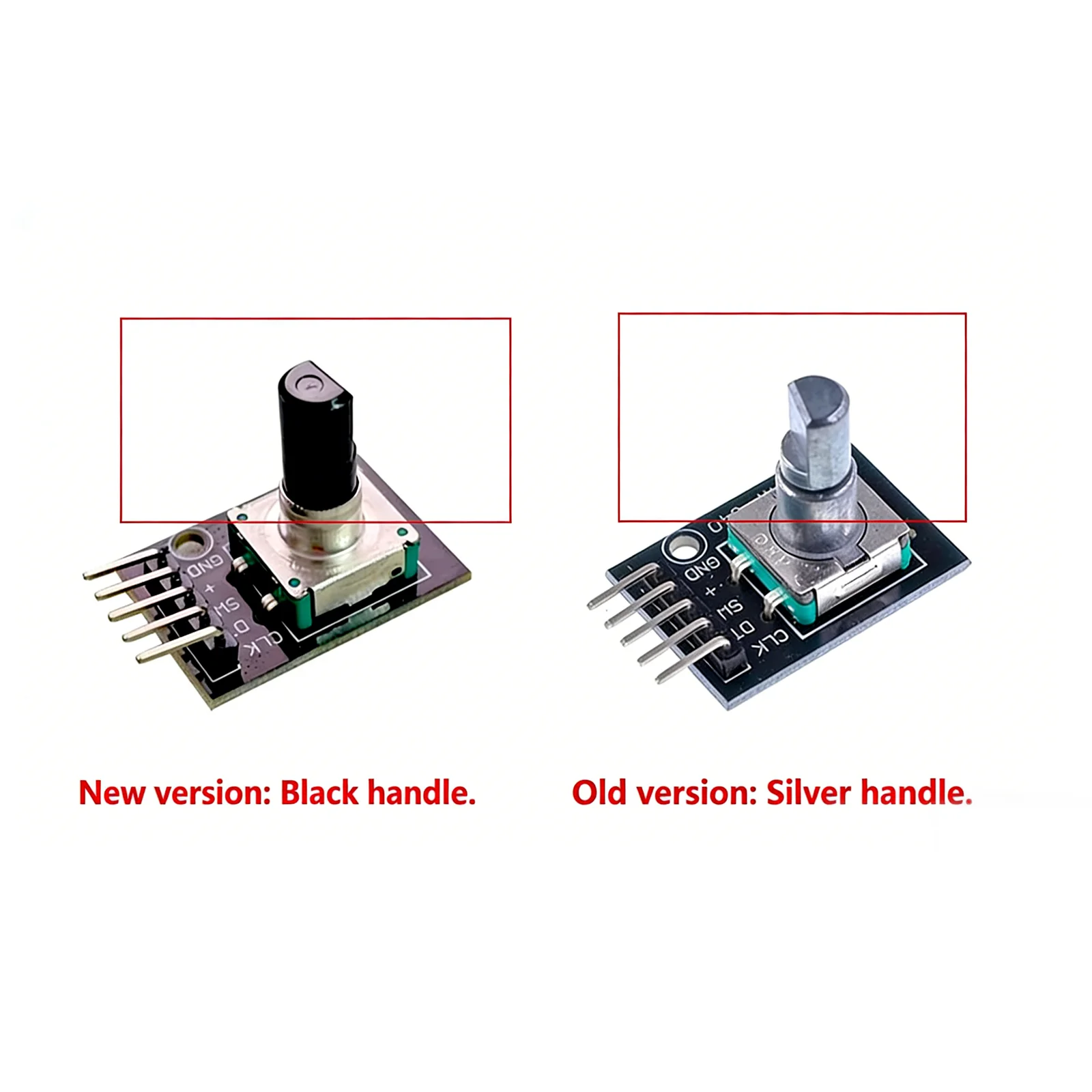
🧰 Knob Cap Version, Ready to Use: "With Knob Cap" option available. Cap fits tightly on the encoder shaft—no slipping during rotation, crisp tactile click on press.
🎯 Multi-Scenario Versatile: Volume control, menu scrolling, value setting, motor speed, LED brightness—anything needing rotary + press interaction.
Product Description
Want to add a physical rotary control to your Arduino project? The KY-040 rotary encoder module is the interaction core you need. Features an EC11 encoder with 360° endless rotation and a built-in push switch. Rotate clockwise to increase, counterclockwise to decrease, press to confirm—intuitive menu operation. 5V powered, three signal wires read all states. Standard 2.54mm headers for breadboard use. Available with knob cap—no need to source caps separately.
Specifications
📌 Note: All dimensions measured manually, allow 1-3mm tolerance. Actual color may vary slightly from pictures due to lighting. Please refer to the physical item.
🔧 Quick Start Guide & Important Tips
🔹 What It Is & What To Verify
✅ This is: KY-040 rotary encoder module. EC11 encoder, 360° rotation + push button. 5V.
❌ This is NOT: An absolute encoder (position resets on power loss). Not a stepper motor encoder.
🔧 You need: Arduino/ESP32, female-to-female Dupont wires, breadboard.
🔹 Wiring Guide
1.GND → GND
2.VCC → 5V
3.SW → Button signal (LOW when pressed)
4.DT → Rotation signal A
5.CLK → Rotation signal B
⚠️ Knob Installation: Align the flat side of the cap with the encoder shaft flat. Press gently—do not hammer, or the encoder internals may be damaged.
🔹 Usage Tips
1.Debouncing Required: Mechanical encoders produce signal bounce. Add 2-5ms debounce delay in code, or readings will be erratic.
2.Direction Detection: When CLK changes, read DT. DT same as CLK = clockwise; DT different from CLK = counterclockwise.
3.Button Reading: SW is normally HIGH, goes LOW when pressed. Debounce the button too.
🔹 Common Questions
❓ Values jump randomly when rotating? 1) Add 2-5ms debounce delay. 2) Check wiring. 3) Different encoder batches may need slightly longer delays.
❓ Button press not detected? 1) Check SW wiring. 2) Set SW pin mode to INPUT_PULLUP in code. 3) You should feel a distinct "click" when pressing.
❓ Rotation direction is reversed? Swap DT and CLK wires, or reverse the direction logic in code.
Free Shipping Over $199
- Standard Shipping: Standard Shipping (12–18 Business Days)
- Express Shipping: Expedited Shipping (5–9 Business Days)
- Free Shipping: Orders over $199 qualify automatically
- Tracking: Full tracking number provided for all orders
30-Day Return Policy
- Returns: 30-day hassle-free return window
- Condition: Items must be unused and in original packaging
- Refund: Full refund processed within 3-5 business days
Why Choose Us?
- Factory Direct: ISO/TS 16949 certified manufacturer
- Quality: 100% electrical continuity tested before shipment
- Experience: 15+ years in automotive connector industry
- Support: Professional technical support available

You may also like
Blog posts
Title
An excerpt of your blog post's content
Title
Date|Author
Subscribe to our emails
Be the first to know about new collections and special offers.