

Triggerable Audio Player for Museum Exhibitions 7-Trigger Sound Player RS485 Alert Speaker BGM Player Triggered by Dry Contacts
Negative Trigger Ver
$247.68
Sale price
$247.68
Regular price
$0.00
Skip to product information




Triggerable Audio Player for Museum Exhibitions 7-Trigger Sound Player RS485 Alert Speaker BGM Player Triggered by Dry Contacts
$247.68
Sale price
$247.68
Regular price
$0.00
Description
SPECIFICATIONS
Battery Included: no
Brand Name: Flyronhitek
Certification: CE,RoHS
High-concerned chemical: none
Model Number: FN-AL7T
Origin: Mainland China
Support Bluetooth: No
Type: Audio Players
Features
1. Negative trigger version and positive trigger version are available.
2. Built-in high quality MP3 player board with 8MB flash memory.
3. Supports inserting USB flash drive and micro SD card as the extended storage devices.
4. Supports max. 32GB USB flash drive and max. 32GB micro SD card.
5. 7 trigger inputs available and they can be connected with as many as 7 buttons/switches/relays, etc.
6. Supports 8 types of trigger modes and each trigger mode can be set easily through a text document.
7. Supports RS485 control mode to meet some industrial applications.
8. Built-in high quality speaker to ensure the sound is loud and clear.
9. Upload audio files through connecting the type-C USB port to computer with a USB data cable.
-The internal flash memory will be detected as a USB flash drive.
10. Sound volume is adjustable through turning the potentiometer.
11. Able to drive an external equipment like a warning light or a motor simultaneously when it is playing a sound.
12. Equipped with a 3.5mm audio output jack that can be connected to an external amplifier or an active speaker.
13. Adopts solid and durable aluminium alloy case.
14. Industrial grade design and strong anti-jamming capability.
Technical Parameters
1. Working voltage: 12-40V DC
2. Working current: ≥1000mA
3. Power Consumption: ≤10W
4. Flash memory size: 8MB
5. Audio format: MP3 or WAV(≤16bit)
8 Types of Trigger Modes
|
Number in Config File |
Corresponding Trigger Mode |
0 |
Short press the button to start playing, and during playing, if you press the button again, the playback will be interruptible and it will play from the beginning. |
1 |
Press the button and hold to start playing repeatedly, and when the button is released the board stops playing. |
2 |
Short press the button to start playing, and during playing, if you press the button again, the playback will be NOT interruptible. |
3 |
In this mode, K1 works as Next, K2 Previous, K3 Play/Pause, K4 Stop, K5 Volume Up, K6 Volume Down, K7 Random playback (it plays a sound randomly after each triggering). Special function: When K1 is short-circuited to GND first and use this mode in the config file and once power is applied, the board is able to play a sound in a loop or play multiple sounds one by one in a loop until power is off. |
4 |
In this mode, sound file 000.mp3 will play in a loop when power is applied. Any button from K1 to K7 (associated 001.mp3 to 007.mp3) can interrupt it and switch to play the associated sound file. Once the associated sound file finishes the playback, sound file 000.mp3 will continue to play in a loop. |
5 |
Each button from K1 to K7 have their associated folders from 01 to 07 respectively. Each folder can store multiple files (for example from 001.mp3 to 030.mp3). Short press the button to play sound file 001.mp3, and short press again to play the next file 002.mp3, and so on. When the last sound file finish playing, short press again to go back to playing file 001.mp3. During playing, if you press the button again, the playback will be interruptible and it will playnext file. |
6 |
The same as mode “5”, but during playing, the playback will be uninterruptible. |
7 |
Each button from K1 to K7 have their associated folders from 01 to 07 respectively. Each folder can store multiple files (for example from 001.mp3 to 030.mp3). Short press the button to play all of the sound files in order one by one. During playing, if you press the button again, the playback will be interruptible and it will playnext file and continue to play the rest of the file. When the last sound file finishes playback, it’ll stop. |
Notes:
1. In the video, it just shows the trigger mode number 0 only.
2. In the video, when working with the PIR motion sensor, it uses the trigger mode number 6.
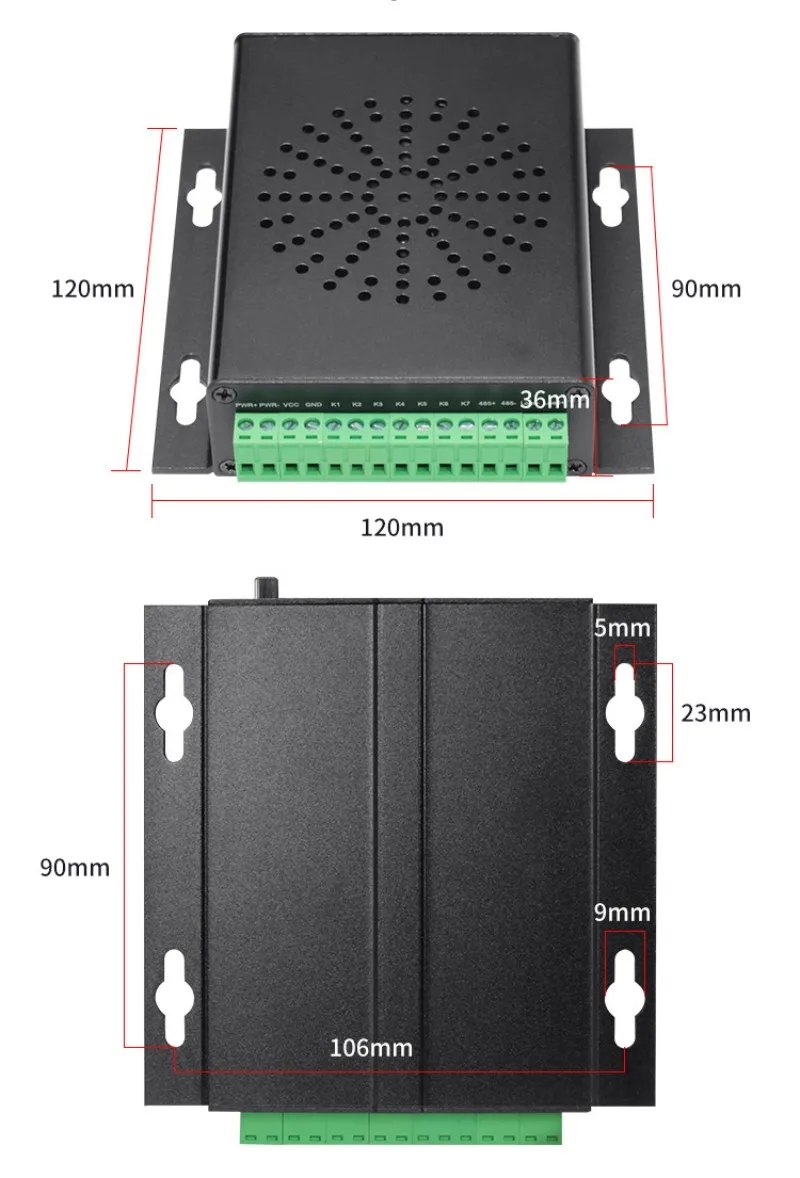
Dimensions
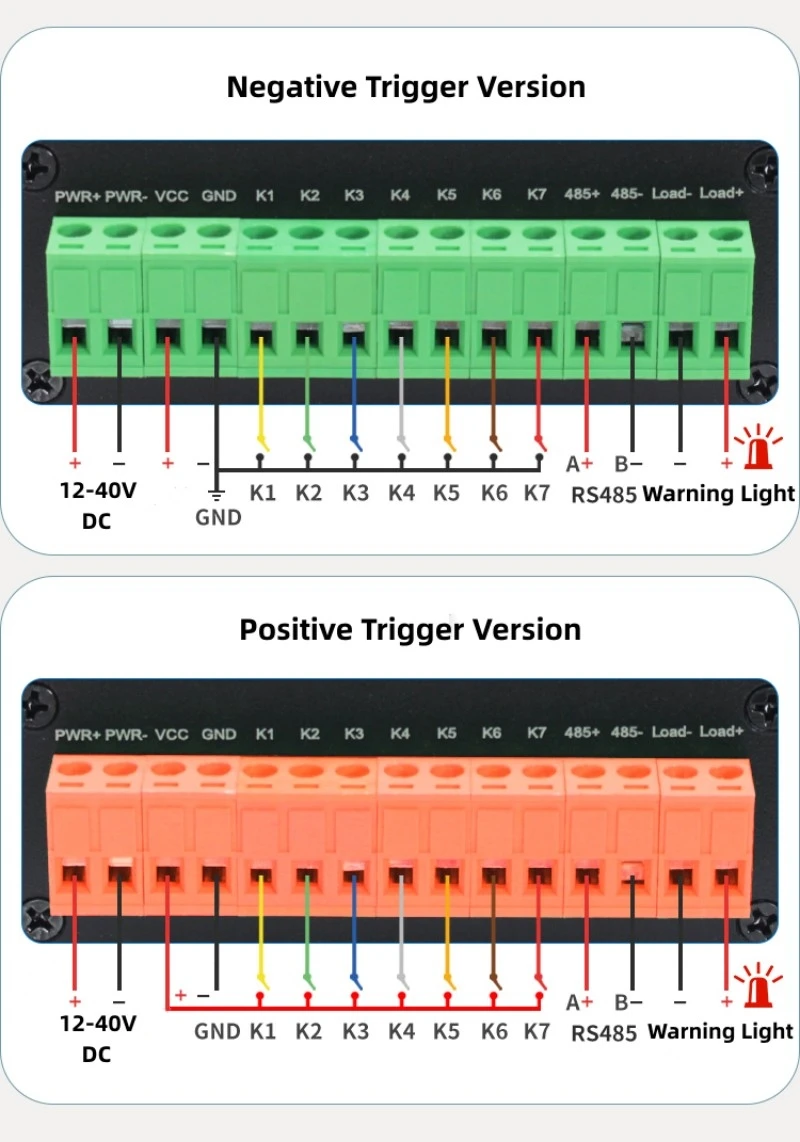
Examples of Wiring Connection
Note: the negative trigger version also can be triggered with a low level signal (0V) while the positive trigger version can be triggered with a high level signal (12-40V) from a PLC or controller. The PLC or controller needs to share the same ground with the player in advance. Both of these versions also can be controlled with RS485 serial communication.
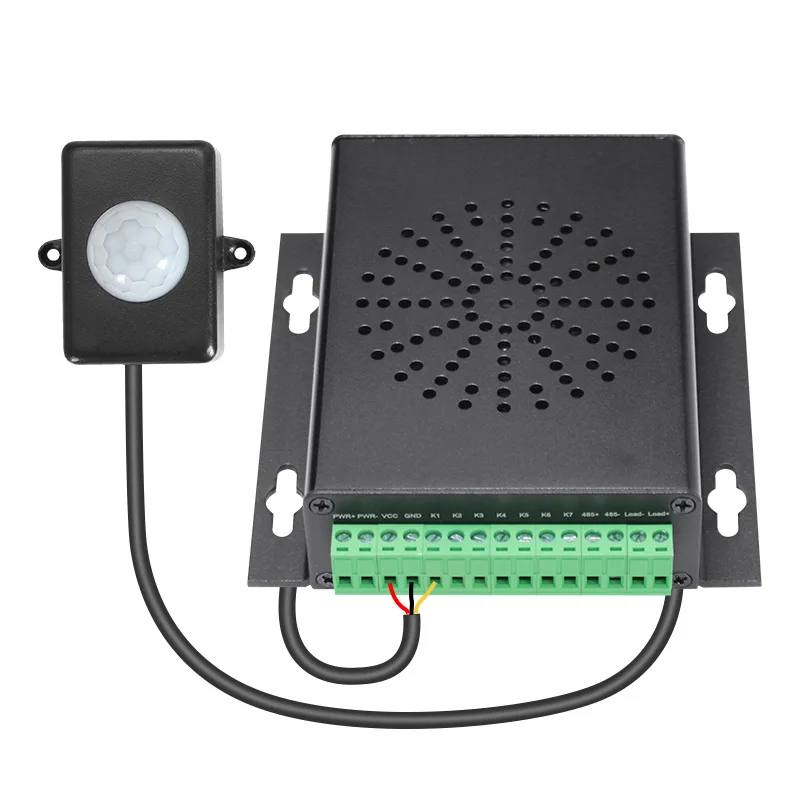
Working with a PIR Sensor
Notes:
1. When the device works with this PIR sensor, please supply 12-24V to the device (not higher than 24V).
2. The power wires (red and black) connect to the terminals VCC and GND of the device, and the yellow wire (signal output from the PIR sensor) connects to the K1 of the device.
3. Please use trigger mode number 2 (for single file only) or number 6 (for mutiple files) in the config file.
Specs for the PIR Sensor
1. Operating voltage: DC 5-24V
2. Current consumption: ≤10mA (DC 12V)
3. Standby current: ≤60uA
4. Level output: 0V (3.3V at standby)
5. Delay time: 3S
6. Detecting distance: ≤6m (not adjustable)
7. Detecting angle: 120
8. Diameter of the Lens: 23mm
9. Outline size: 52L*36W*23H mm
10. Diameter of the mounting hole: 2.5mm
11. Length of the cable: 45cm
12. Operating temperature: -20C to +50C
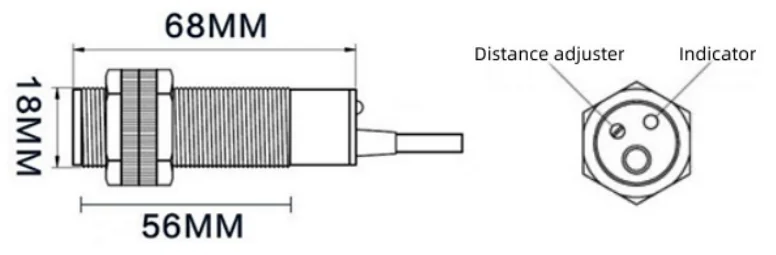
Working with a Photoelectric (PE) Sensor
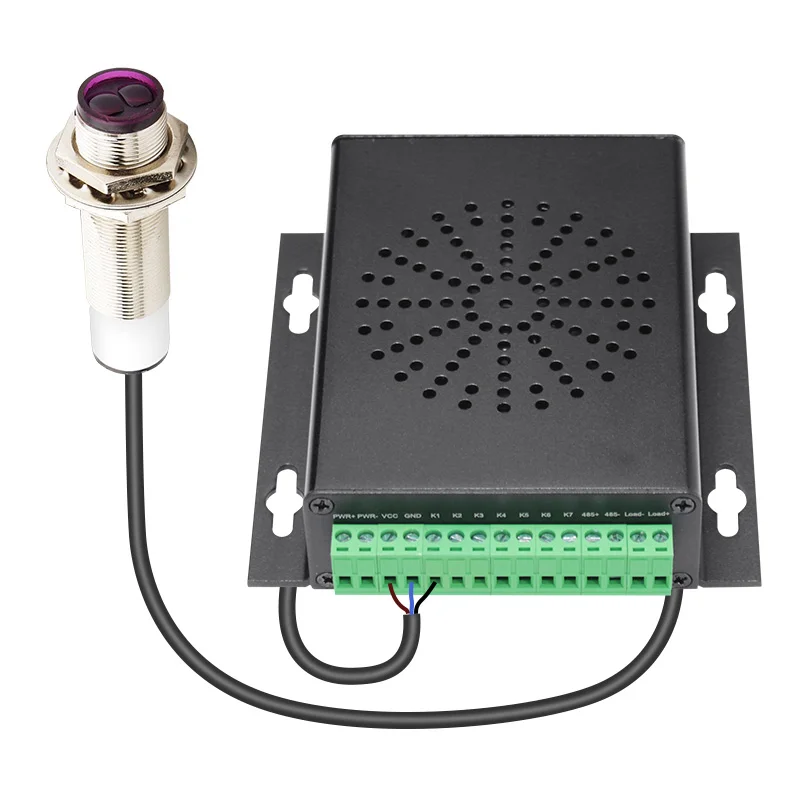
Notes:
1. When the device works with this photoelectric sensor, please supply 12-36V to the device (not higher than 36V).
2. The power wires (brown and blue) connect to the terminals VCC and GND of the device, and the black wire (signal output from the photoelectric sensor) connects to the K1 of the device.
3.We suggest customers use trigger mode number 1 (for single file only and when the sensor keeps detecting a person or an object it’ll play the sound in a loop), number 2 (for single file only), or number 6 (for multiple files) in the config file.
Specs for the Photoelectric (PE) Sensor
1. Operating voltage: 6-36V DC
2. Power consumption: lower than 1.5W/hour
3. Triode type: NPN
4. Pointing angle of the sensor: 3-5 degree
5. Response time of the sensor: 2ms
6. Detecting distance: 10-250cm (adjustable)
7. Detected object: any type of object
8. Insulation resistance: higher than 20M ohms
9. Operating temperature: -25C to +80C
10. Length of the cable: 120cm
Free Shipping Over $199
- Standard Shipping: Standard Shipping (12–18 Business Days)
- Express Shipping: Expedited Shipping (5–9 Business Days)
- Free Shipping: Orders over $199 qualify automatically
- Tracking: Full tracking number provided for all orders
30-Day Return Policy
- Returns: 30-day hassle-free return window
- Condition: Items must be unused and in original packaging
- Refund: Full refund processed within 3-5 business days
Why Choose Us?
- Factory Direct: ISO/TS 16949 certified manufacturer
- Quality: 100% electrical continuity tested before shipment
- Experience: 15+ years in automotive connector industry
- Support: Professional technical support available

You may also like
Blog posts
Title
An excerpt of your blog post's content
Title
Date|Author
Subscribe to our emails
Be the first to know about new collections and special offers.